External Release Notes: iOS Mobile App for Intune v 9.9 (August 5, 2026)
New Features and Enhancements
Updated Sign-In Flow
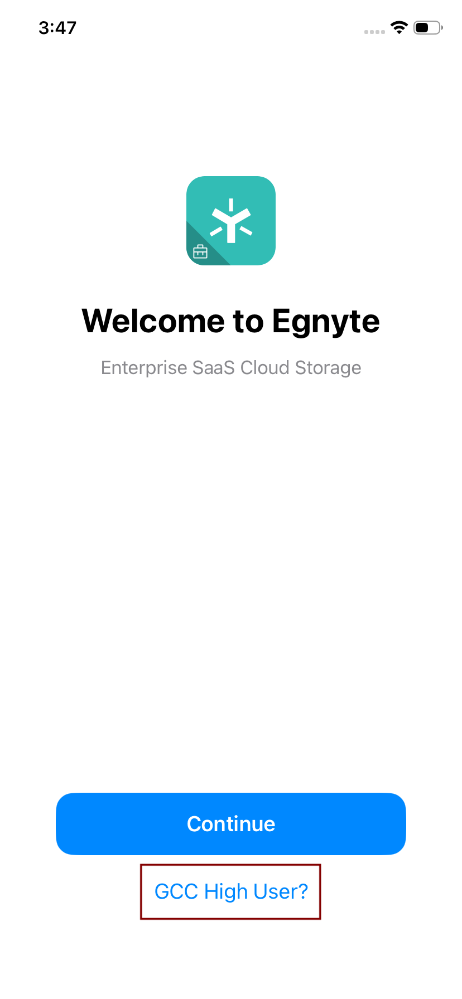
Version 9.9 introduces a revised sign-in experience for the Egnyte for Intune iOS app. A new welcome screen is displayed when users sign in for the first time after installation, presenting two options: Continue for users on a standard Microsoft commercial tenant, and GCC High user? for users on a Microsoft Government Community Cloud High (GCC High) tenant.
Following the initial Microsoft authentication step, the app completes Intune enrollment and prompts a one-time app restart, users must manually reopen the app by tapping its icon after the restart notification is shown. Users who are already signed in when they update to version 9.9 are not required to sign in again.
Full details are available in Signing in to the Egnyte for Intune iOS App.
Service Principal Registration
Starting with version 9.9, the Egnyte for Intune iOS app automatically registers a Service Principal in the organization's Microsoft Entra ID tenant on first use, administrators no longer need to create it manually. However, a Global Administrator may still need to grant admin consent before users can sign in successfully. If consent has not been granted, users may see a Login blocked error indicating that the app could not access the user's AAD token.
The steps for granting consent are described in here.
Conditional Access Support
Starting with version 9.9, Conditional Access policies configured in Microsoft Entra ID are enforced both at sign-in and each time the app is brought back to the foreground from the background. This means that changes to Conditional Access policies made by an IT administrator take effect the next time a user opens the app, without requiring a full sign-out. Users affected by a policy change are presented with an in-app notification offering the option to sign in again or remove their account.
IT administrators are encouraged to review their Conditional Access policy assignments before the update reaches their users. Full impact scenarios and admin guidance are available in Conditional Access in the Egnyte for Intune iOS App.
GCC High Tenant Support
The Egnyte for Intune iOS app now supports users whose organizations operate on a Microsoft Government Community Cloud High (GCC High) tenant. GCC High users can access the app by selecting GCC High user? on the welcome screen shown at first sign-in, which routes authentication through the GCC High Microsoft identity platform. Setup details and administrator configuration reference are available in GCC High Tenant Support in the Egnyte for Intune iOS App. This update also resolves sign-in failures that affected users on GCC High tenants in previous versions of the app.
AI Connectors
Users can now leverage external app connectors directly within AI Assistant conversations on mobile. A new source selector allows users to view and toggle which connected apps (for example, Slack, Outlook, or Salesforce) AI Assistant on Mobile draws from when responding to prompts. Users can set up and manage connectors only in the Egnyte web AI Hub. On mobile, only connectors that were already configured on the web can be accessed. AI Assistant responses combine Egnyte file insights with information pulled from all active external connectors, enabling richer, cross-platform answers without leaving the mobile app.
Share AI Assistant Chat Links
Users can generate a secure, shareable link for any AI Assistant conversation and send it to colleagues via email or messaging apps. Recipients authenticated on the same Egnyte domain can open the link in the app to view the full transcript and continue the conversation in their own private AI Assistant session.
AI Powered Search
A new AI-driven search experience allows users to find files using conversational language instead of manually applying filters. Queries such as pdf file I recently opened are automatically translated into structured search parameters, applying file type, date range, and other filters without requiring users to navigate filter menus.
AI-Powered Search is available to users on domains with an active AI Add-on. Contact the Egnyte account manager or Sales team for more information.
Project Center
A dedicated Project Center view is now available on mobile, bringing the project-first interface to iPhone and iPad. The view aggregates all folders designated as Projects into a single dashboard, giving project stakeholders a faster way to locate and open their active work without navigating deeply nested folder hierarchies.
This feature is available for all customers that have Projects Hub enabled. Contact the Egnyte Account Manager or Sales team for more information.
HEIC/HEIF Image Upload
Users can now upload photos in their original HEIC or HEIF format when selecting files from the Photos Library via the +Create or upload button in the Egnyte app. Previously, the app automatically converted these files to JPEG before uploading; files are now transmitted in their native format, preserving full image quality and metadata.
Issues Addressed
Thumbnails Not Rendering for Image Files in Large Folders
Users of the Egnyte for iOS app reported that thumbnails for PNG, JPG, and JPEG files were not displaying in folders with a large number of images. The app now correctly renders image thumbnails regardless of directory size.
Additional Information and Resources
How to Upgrade
Visit the Apple AppStore to download the latest version of the Egnyte iOS Mobile App for Intune (v 9.9) or update the existing app to the newest version on all devices. It may take up to seven days for the latest version to propagate to all user devices. However, users can manually upgrade their app immediately after the release.