External Release Notes: Android Mobile App v 9.0 (November 19, 2025)
New Features and Enhancements
User Homepage on Android
The Egnyte Android Mobile App introduces a new customizable homepage. It provides quick access to frequently used files, tasks, and tools, reducing navigation time.
The homepage includes widgets for Files & Folders, Recent Files, Egnyte's AI Assistant, Tasks, Smart Upload, Recent Project Folders, and Quick Access. Widgets can be added, hidden, reordered, and resized. Users may also adjust the homepage theme.
The Egnyte's AI Assistant, Recent Projects, and Smart Upload widgets are only visible and available to customers whose current Egnyte plan includes these features.
Co-Editing with Google Docs on Mobile
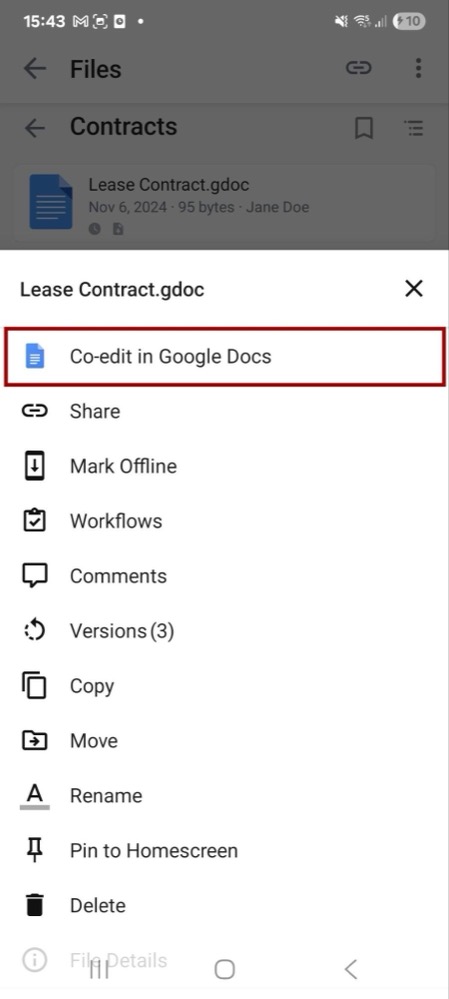
Co-editing support for Google Docs, Sheets, and Slides in the Egnyte Mobile App will begin rolling out as the new generation of Google Workspace integration is now made generally available on mobile.
The feature allows multiple collaborators to edit Google files simultaneously from mobile, with changes reflected in real time and preserved in Egnyte.
Improvements to Co-Editing with Microsoft Office on Android
Enhancements have been made to the co-editing experience for Microsoft Office files in the Egnyte Android app.
When a co-editing session is active, the Rename, Delete, and Move options are now disabled to prevent unintended file changes during collaboration.
In addition, an entry point for co-editing has been added when previewing a shared link to a Microsoft Office file, enabling a seamless transition into a live co-editing session.
Issues Addressed
Mobile File Upload Reliability
In some cases, files uploaded through the Egnyte mobile app or via the Share to Egnyte option could remain in a persistent uploading or waiting state and not complete, regardless of network connection.
Improvements have been made to the upload service to prevent uploads from stalling for extended periods. Additional logging has also been introduced to better identify device-specific conditions that may impact uploads, supporting ongoing reliability enhancements.
Folder Name Validation During Share to Egnyte
When creating a new folder while sharing files to Egnyte, entering a folder name with a trailing space resulted in a network error message instead of indicating an invalid folder name.
This issue has been resolved. A clear invalid name message is now shown when the folder name contains unsupported characters.
Additional Information and Resources
How to Upgrade
To upgrade to the latest version of the Egnyte mobile app and take advantage of the latest enhancements, download the Egnyte Android App v. 9.0 from the Google Play Store.